
By [TrickDigi]
For three years, I was a Notion evangelist.
I told everyone to use it. I spent hours watching YouTube tutorials on how to build the perfect “Life OS.” My dashboard was a work of art—it had weather widgets, motivational quotes, progress bars, and nested databases for everything from my grocery list to my business goals.
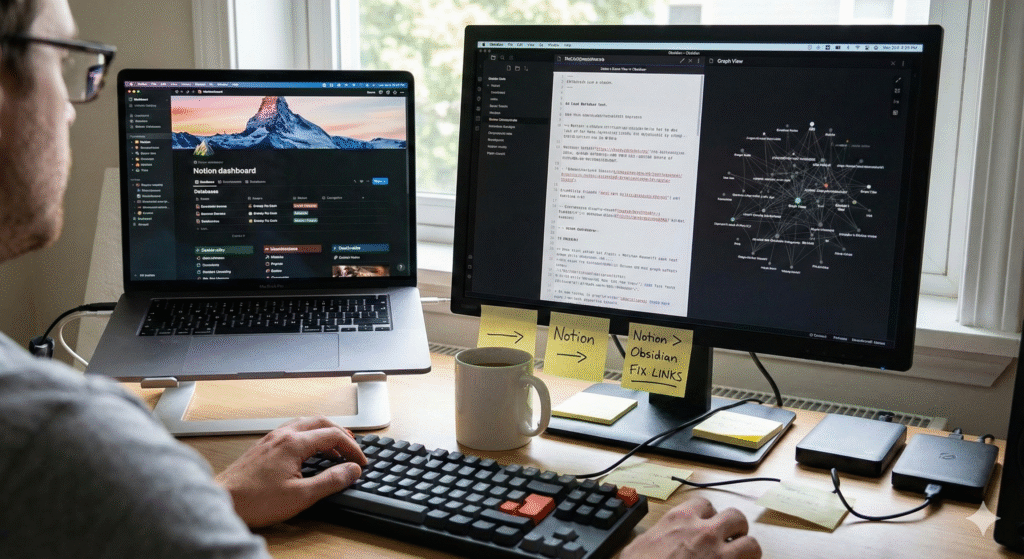
But about six months ago, I did the unthinkable. I exported everything, cancelled my subscription, and moved my entire digital life to Obsidian.
I didn’t do it because Notion is bad. I did it because Notion became too heavy.
If you are feeling overwhelmed by your own productivity system, or if you are worried about where your data actually lives, here is the honest story of my migration—including the headaches, the broken links, and why I finally feel “productive” again.
The Breaking Point: The “Decorator” Syndrome
The problem wasn’t the software; it was how the software made me behave.
Notion is beautiful. It is essentially “Legos for adults.” But because it is so customizable, I found myself suffering from “Decorator Syndrome.”
I would sit down to write a blog post.
-
Step 1: Open Notion.
-
Step 2: “Oh, this page looks boring. Let me find a nice cover image from Unsplash.”
-
Step 3: “Let me change the icon.”
-
Step 4: “Maybe I should restructure this database view.”
Twenty minutes would pass, and I hadn’t written a single word. I was productive at organizing, but I wasn’t productive at creating.
Then there was the Lag. As my database grew to thousands of pages, the startup time on mobile became painful. Waiting 10 seconds to capture a quick idea meant I often forgot the idea before the app opened.
Enter Obsidian: The Ugly Duckling
Obsidian is the opposite of Notion. When you first open it, it looks… empty. It’s just a dark screen and a blinking cursor.
It works on local Markdown files.
-
Notion: Your data lives on their servers in a proprietary format.
-
Obsidian: Your data lives on your hard drive as plain text files (
.md).1
This means two things:
-
Speed: It opens instantly. There is no server to connect to.
-
Ownership: If Obsidian goes out of business tomorrow, I still have all my folders and text files. I can open them in Notepad.
The Migration Nightmare (Real Talk)
If you are thinking of switching, be warned: It is not a seamless click.
I used the official “Importer” plugin, and while it moved the text, it broke the structure.
-
The Database Issue: Notion excels at databases.2 Obsidian excels at linking. When I imported my “Task Database,” it turned into a messy list of ugly text files. I had to completely reinvent how I tracked tasks.
-
The Image Issue: Many of my images didn’t transfer correctly or ended up with broken file paths. I spent an entire weekend manually fixing links.
The Lesson: Do not migrate your entire history. Only migrate your “Active Projects.” Leave the archives in Notion as a backup. Trying to move 3 years of history at once almost made me quit.
Comparison: The Trade-Offs
After using Obsidian for 6 months, here is how the two stack up for my workflow.
| Feature | Notion | Obsidian | Winner |
| Speed | Slow (Web-based) | Instant (Local) | Obsidian |
| Aesthetics | Beautiful, drag-and-drop | Plain text, requires CSS tweaks | Notion |
| Collaboration | Excellent (Team features) | Difficult (Requires sync setup) | Notion |
| Offline Access | Spotty / Unreliable | 100% Offline | Obsidian |
| Data Ownership | Vendor Lock-in | You own the files | Obsidian |
Why I Stayed with Obsidian
Despite the messy migration and the lack of pretty widgets, I am never going back.
1. The “Graph View” Changed My Thinking
Obsidian has a feature where it visualizes your notes as a web of connected dots.3
In Notion, my notes were in folders (silos). In Obsidian, I link notes together.
-
Example: I write a note about “Marketing.” I link it to a note about “Psychology.” Suddenly, I see connections between topics I hadn’t noticed before. My “Second Brain” actually feels like a brain now.
2. Deep Focus
Because I can’t easily add widgets or change colors, I just write. The limitations force me to focus on the content, not the container.
3. Future Proofing
I realized that “Plain Text” is the only file format that will definitely exist in 50 years. I don’t know if Notion will exist in 2075. I don’t know if Microsoft Word will. But plain text is universal.
Conclusion: Which One Should You Use?
This wasn’t a migration of software; it was a migration of philosophy.
Stick with Notion if:
-
You work in a team and need to assign tasks to others.
-
You want a beautiful “Dashboard” to organize your life visually.
-
You need powerful databases with formulas.
Switch to Obsidian if:
-
You are a writer, coder, or researcher.
-
You value speed over aesthetics.
-
You are paranoid about data privacy and want to own your files offline.
For me, trading the “pretty” dashboard for a “fast” text editor was the best productivity hack of the year. I write more, I tweak less, and my data is finally mine.
-
Disclaimer: I have no affiliation with the software mentioned. This comparison is based on my personal workflow migration from Notion Personal Pro to Obsidian v1.5.