
By [TrickDigi]
I am the “IT guy” for my family.
When my mom gets a suspicious text message, she asks me. When my friends get a weird pop-up on their laptop, they call me. I pride myself on being vigilant. I use a Password Manager. I use Two-Factor Authentication (2FA). I thought I was immune.
Last Tuesday, at 7:30 AM, I proved myself wrong.
I fell for a phishing scam. I clicked the link, and I typed in my credentials.
I caught myself seconds before it was too late, but the experience shook me. It proved that in 2025, hackers don’t hack computers; they hack psychology.
Here is the anatomy of the scam that fooled me, why it worked, and the security changes I made five minutes later.
The Setup: The “Urgency” Trap
The attack didn’t happen when I was alert. It happened when I was vulnerable: early in the morning, before my first cup of coffee, while scrolling through notifications on my phone in bed.
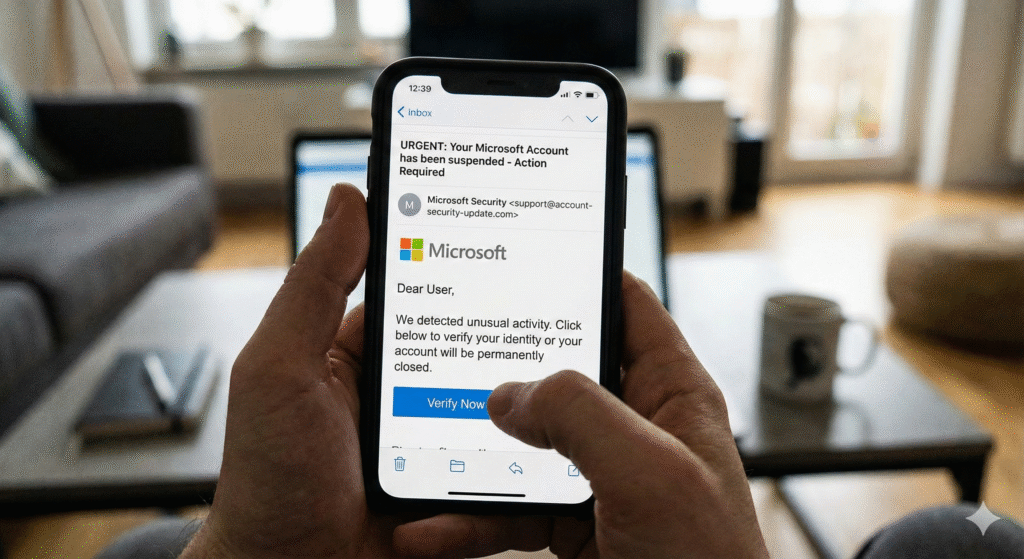
I saw an email notification that appeared to be from my Web Hosting Provider.
Subject: URGENT: Your domain will be suspended in 24 hours due to failed payment.
My heart stopped. My website is my business. If my domain goes down, my email goes down, and I lose money.
The email looked perfect. It had the correct logo. It used the correct font. It even addressed me by my first name. It said: “We attempted to charge your card ending in 1234, but it was declined. Please update your billing info immediately to avoid service interruption.”
The Trigger: The “1234” (not the real numbers) actually matched the last 4 digits of my card. (I later realized this was likely data from a previous, unrelated data breach found on the dark web).
The Mistake: The Click
Because I was panicked about my business going offline, I bypassed all my mental checklists.
I didn’t check the “From” address. I didn’t hover over the link. I just tapped the big blue button that said [Update Payment Method].
It took me to a login page. It looked exactly like my host’s login portal. I typed my username. I typed my password. I hit “Login.”
The Realization: The “URL” Glitch
The moment I hit enter, the page refreshed, but it didn’t log me in. It just redirected me to the real homepage of the hosting company.
That was the “glitch in the matrix.”
My brain woke up. “Why didn’t it take me to the billing dashboard?”
I looked at the URL history in my browser. The page I had just typed my password into wasn’t myhost.com. It was myhost-billing-support-secure.net.
My stomach dropped. I had just handed the keys to my entire business to a stranger.
The Cleanup: The “Golden 5 Minutes”
If you realize you have been phished, speed is your only defense.
-
The Race: I immediately navigated to the real website (typing the URL manually).
-
The Lockout: I logged in successfully (Thank God, the hackers hadn’t changed the password yet—bots usually take a few minutes to process the stolen data).
-
The Change: I changed the password to a randomly generated string of 25 characters.
-
The Kill Switch: I went to “Active Sessions” in the settings and hit “Log Out All Devices.”
Post-Mortem: Why It Worked (Social Engineering)
Later that day, I analyzed the fake email on my desktop to see how I missed it.
-
Mobile Blindness: On a phone, you often can’t see the full “From” email address unless you tap on the sender’s name. On a desktop, I would have seen the sender was
support@random-server-12.com, not the official company. -
Specific Data: They had the last 4 digits of my card. This added a layer of legitimacy that bypassed my skepticism.
-
The Threat: They threatened “Loss of Service.” Fear shuts down the logical part of your brain.
My New Security Stack (What I Changed)
I realized my “Basic Security” wasn’t enough. I upgraded my personal security stack that same afternoon.
1. Hardware Keys (YubiKey)
I stopped using SMS text messages for 2FA. SMS can be intercepted (SIM Swapping). I bought a physical hardware security key. Now, even if a hacker has my password, they can’t log in unless they physically steal the USB key off my keychain.
2. A Dedicated “Admin” Email
I realized I was using the same email address for my Facebook login as I was for my Bank and Hosting. I created a secret email address only for financial and infrastructure accounts. I do not use it for newsletters or social media. This keeps it off spam lists.
3. The “Pause” Rule
I made a new rule for myself: Never resolve a crisis on a phone screen. If I get an email that says “Urgent,” I force myself to walk to my computer, open a browser, and type the website URL manually. I never click the link in the email.
Conclusion: You Are The Firewall
Antivirus software is great, but it can’t stop you from opening the door and inviting the burglar in.
The hackers didn’t use a complex code to crack my system. They just asked me nicely to let them in, and I almost did.
No matter how tech-savvy you are, you are human. You get tired, you get scared, and you get distracted. That is what they are banking on.
The next time you get an email that makes your heart race, take your hand off the mouse. Take a breath. And look at the URL.
-
Disclaimer: I am not a cybersecurity professional. This article shares my personal experience. For robust security, consider consulting an expert and using enterprise-grade protection tools.